
Quick answer
Compare the 100 Mbps or Gigabit example panel to identify power, fiber, Ethernet and speed indicators. Confirm exact definitions in the model- and version-specific manual.
Symptoms
- Identify PWR, FX, TX Link/ACT, speed or duplex status
- Compare the original image definitions with a text table
Applicability and checks before use
Indicator reference for the AEO 100 Mbps and Gigabit fiber media converter example panels. It applies only to the devices represented by those panels; consult the relevant manual for other models.
Troubleshooting steps
Identify the panel and indicator labels first
Compare the original image with the 100 Mbps or Gigabit panel and confirm the full product model and version. Do not use this table for diagnosis if the indicator names, interfaces or definitions do not match.
Then check the remote device and service
Interpret the example states using the table while checking the remote equipment and actual communication. An illuminated fiber-link indicator does not prove that every service is operating; a speed indication alone does not rule out cable or device faults.
Example panels
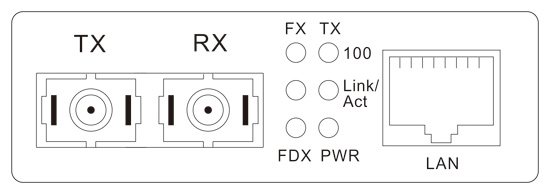
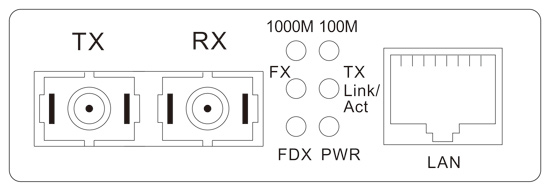
Indicator definitions
| Example panel | Indicator | State | Meaning and applicability |
|---|---|---|---|
| 100 Mbps example panel | PWR | On | Power is present. |
| Off | No power input, or a device fault. | ||
| FX | On | An optical signal is present. | |
| Off | No optical input signal, or a device fault. | ||
| FX Link/ACT | On | Fiber link is connected. | |
| Flashing | Fiber link is operating and data is being transferred. | ||
| Off | Fiber link is not connected. | ||
| FDX | On | Full duplex. | |
| Off | Half duplex. | ||
| TX-100 | On | 100 Mbps signal. | |
| Off | 10 Mbps signal. | ||
| TX Link/ACT | On | Ethernet link is connected. | |
| Flashing | Ethernet link is connected and data is being transferred. | ||
| Off | Ethernet link is not connected. | ||
| Gigabit example panel | PWR | On | Power is present. |
| Off | No power input, or a device fault. | ||
| 1000M | On | 1000 Mbps signal. | |
| Off | 10/100 Mbps signal. | ||
| 100M | On | 100 Mbps signal. | |
| Off | 1000 Mbps signal in the condition listed by the original diagram; interpret together with the 1000M indicator and the model manual. | ||
| FX Link/ACT | On | Fiber link is connected. | |
| Flashing | Fiber link is operating and data is being transferred. | ||
| Off | Fiber link is not connected. | ||
| FDX | On | Full duplex. | |
| Off | Half duplex. | ||
| TX Link/ACT | On | Ethernet link is connected. | |
| Flashing | Ethernet link is connected and data is being transferred. | ||
| Off | Ethernet link is not connected. |
How to confirm recovery
Indicator states have been checked against the exact model manual, remote-device and cable issues have been ruled out, and communication between the actual end devices has been verified.
If the issue remains
Record the full model, hardware/firmware version, power arrangement, wiring topology, time of failure and indicator states, then contact technical support.
Related products and resources
The table transcribes the 100 Mbps and Gigabit indicator diagrams. The original images do not identify specific models. The Gigabit 100M-off entry lists only the 1000M condition; do not extend it to every speed combination or the current product range.