
Problem addressed
Trenching or new cabling may be impractical between buildings and at lift or temporary construction sites. Obstructions and interference can affect links. Assess radio propagation, service traffic and power together.
Solution benefits
- Connect cabling-constrained sites
Use matching wireless bridges where the surveyed radio conditions are suitable. - Reduce inter-building cabling
Plan the span between buildings as a wireless link while providing secure mounting and power at both ends. - Integrate with the existing network
Bridge the two networks with compatible Ethernet connections and uplinks. - Size the link for actual service traffic
Use video bitrate and usable throughput rather than headline radio rate alone.
Suitable applications
- Campus or building-to-building links where line of sight can be surveyed.
- Sites where new cabling is impractical but fixed mounting and power at both ends are available.
- Temporary links with defined deployment periods and verifiable traffic requirements.
Connection overview
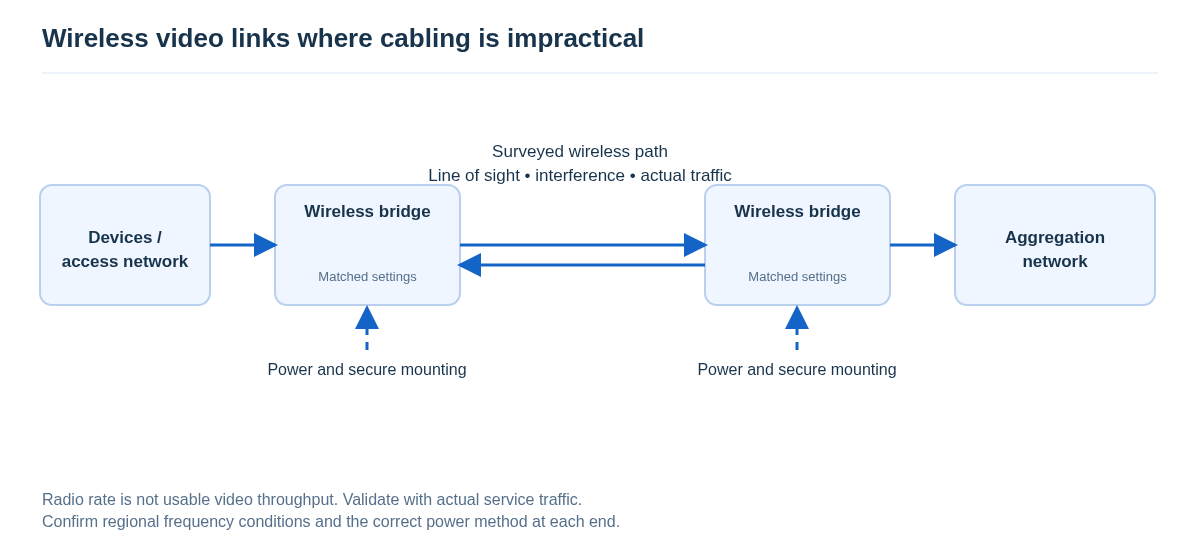
Field devices / local access network → one bridge ⇄ surveyed wireless path ⇄ matching remote bridge → aggregation network.
Confirm operating modes and pairing at both ends. For multipoint operation, check aggregate traffic separately. Advertised wireless rate is not the usable bandwidth available for video. A 4G status-reporting terminal does not replace this video link.
Equipment selection
Models and optional equipment must be matched to the actual site. These items do not form a fixed kit.
| Equipment | Role and selection conditions |
|---|---|
| Wireless bridge AEO-CX7210-S, AEO-CX7510-S, AEO-CX7511-S | Select a compatible pair for the frequency band, operating mode, Ethernet ports and site survey. No single distance is promised for all sites. |
| PoE switch | Optional when several end devices require aggregation. Confirm whether the relevant ports provide compatible power. |
| Power adapter / injector | Check bridge voltage, polarity, pin assignments and connectors. Confirm standard and non-standard power methods separately. |
| Network surge protector | Where network-line protection is needed, check interfaces, data rate and power compatibility. |
| Power surge protector | Select for the actual supply conditions and protection design at each end. |
Information needed for selection
Provide photographs from both ends, obstructions, mounting heights, camera count and bitrates, network ports and power information. Do not connect non-standard powered equipment to an arbitrary PoE port. Validate the configured link with actual service traffic.